Epona

Introducing the New Epona365 Web interface

Meet the New Epona365 Web interface

This new release of Epona365 Web is more than a visual refresh. It is a complete redesign based on customer feedback, usability research, and input from specialized design experts. The result is a cleaner, more intuitive experience that helps users find information faster, navigate matters more efficiently, and take advantage of the latest innovations within Epona365.

The new UI replaces the previous interface and will serve as the foundation for future enhancements, performance improvements, hotfixes, and new features. To receive all of these in the future an update to the new UI is required.

Simplified Navigation and Better Orientation

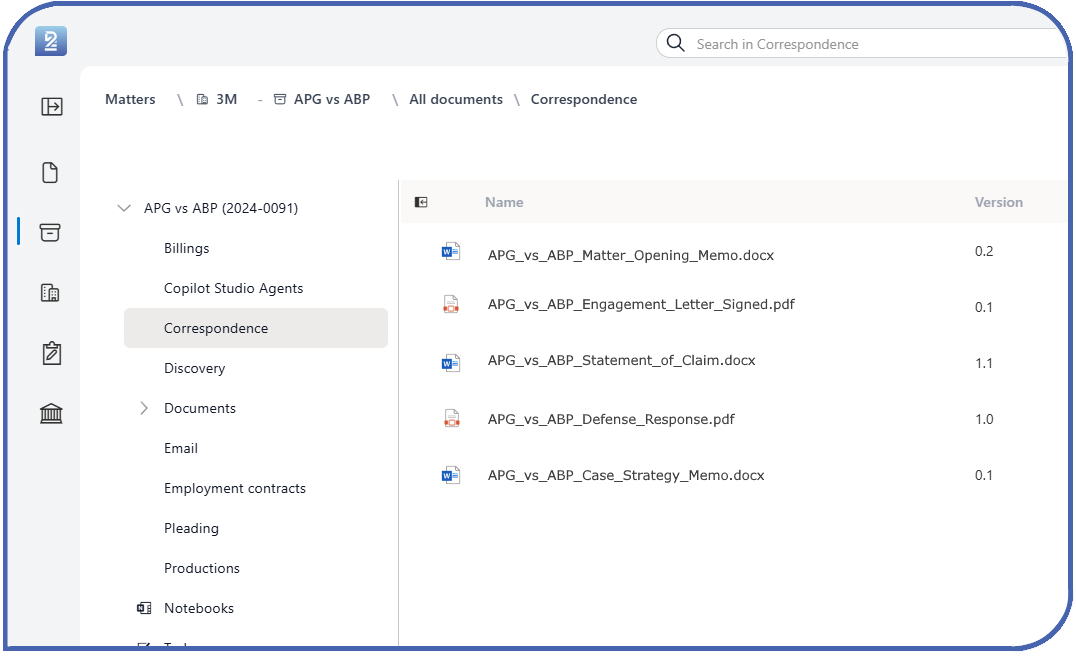
The new interface introduces a compact icon-based navigation panel combined with a breadcrumb trail. This provides more screen space for your work while making it easier to understand exactly where you are within Epona365 and quickly move between locations.

Built-in AI Assistance with Ask Epona

The new interface includes a dedicated Ask Epona button, providing direct access to AI-powered assistance from anywhere within the application.

One Central Documents Experience

The new Documents area brings all content together in a single location. Quickly switch between:

  • My Documents
  • Recent Documents
  • Favorite Documents
  • All Documents

This makes it easier than ever to find the information you need across matters and projects.

Why Upgrade?

By moving to the new UI, your organization can benefit from:

  • Improved user experience and productivity
  • Faster navigation and easier access to information
  • Consistent workflows across documents and matters
  • Access to future features and innovations
  • Ongoing performance improvements and hotfixes

How to Get the New UI

The new UI is available as an update to Epona365 Web. The update process is similar to a regular Epona365 Web upgrade.